FNA Process: Calculate EVT Acres
Calculating EVT Acres in Microsoft Excel
Once you’ve processed your attribute table, the first step is calculate how many acres are in each EVT in addition to how many acres are in each BpS. To calculate EVT acres, create a new field called EVT acres, which will be driven by the count field in the CSV. Here’s how to do it:
Step-by-Step Process
Screenshots of the process are included below the written instructions for those who find them useful.
Create a New Field for EVT Acres
- Insert a new column next to the COUNT field and name it EVT Acres.
Calculate Acres Using the Pixel Count Field
- In the first cell of the new “EVT Acres” column, enter the formula: = [COUNT] * 900 * 0.000247 Replace [COUNT] with the cell reference for the COUNT field in the same row.
This is the same calculation we used to calculate BpS Acres in ArcGIS Pro. You can do this in either GIS or your spreadsheet program, whichever you feel more comfortable working with.
- Copy the Formula Down the Column
- Drag the fill handle (a small square at the bottom-right corner of the cell) down the column to apply the formula to all rows.
Screenshot for calculating EVT acres
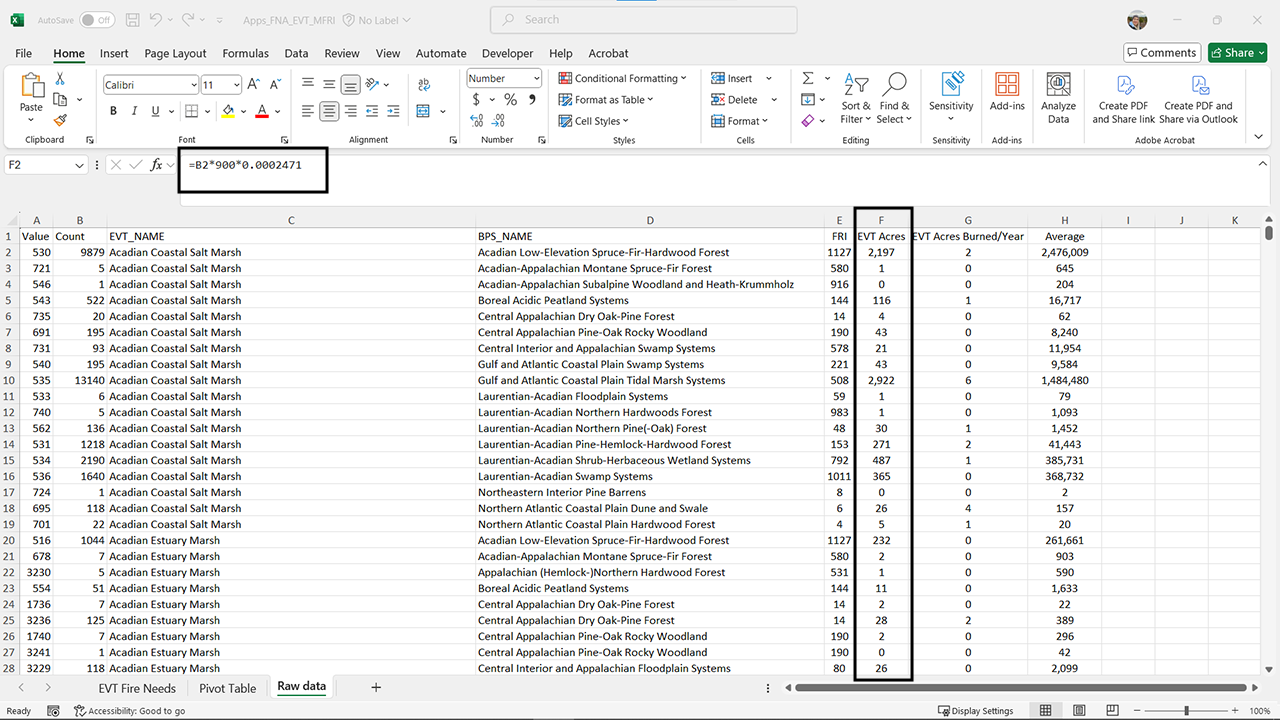
This process will calculate the EVT acres for each row in your table, allowing you to analyze the data more effectively. From here, you can add another field to calculate the EVT acres burned per year for a comparison with the BpS acres burned per year. You can use the same process for this that you used when calculating BpS acres burned per year.
Right now, we are still assuming that the underlying historical fire return interval applies to existing vegetation. This may not be the case for your landscape. We will provide options for how to adjust this in a later section of this site.
Still have questions? LANDFIRE is here to help.
Ask the LANDFIRE Helpdesk (email link).
Search and subscribe to the LANDFIRE YouTube Channel (see tutorials, Office Hours, quick demonstrations).
Join an Office Hour (monthly meeting with open format Q & A with LANDFIRE experts).
Schedule a meeting (email link) with TNC’s LANDFIRE Team.