FNA Process: Current vegetation
Examining existing vegetation types
Assessing current fire needs involves understanding the current vegetation types and adjusting historical fire return intervals to reflect current management practices. This guide will walk you through the process using ArcGIS Pro, focusing on the LANDFIRE Existing Vegetation Type (EVT) data.
Step-by-step process
Screenshots of the process are included below the written instructions for those who find them useful. Steps that are the same as those we covered in the section on historical fire regimes have been omitted.
Identify Current Vegetation Types
Load LANDFIRE Existing Vegetation Type Data: Begin by loading the LANDFIRE Existing Vegetation Type layer into ArcGIS Pro.
Clip to Area of Interest: Use the Clip Raster tool or the Extract by Mask tool to clip the EVT data to your specific area of interest. This will help you focus on the relevant geographic region.
Examine Vegetation Types: Review the vegetation types for your area and decide which to keep in the analysis and which you do not want to count in fire needs planning. At a minimum, we recommend removing urban areas, agricultural areas, open water, no data values, and the grouped value of ‘quarries, strip mines, gravel pits, wind and well pads’.
Eliminate Non-Relevant Vegetation Classes
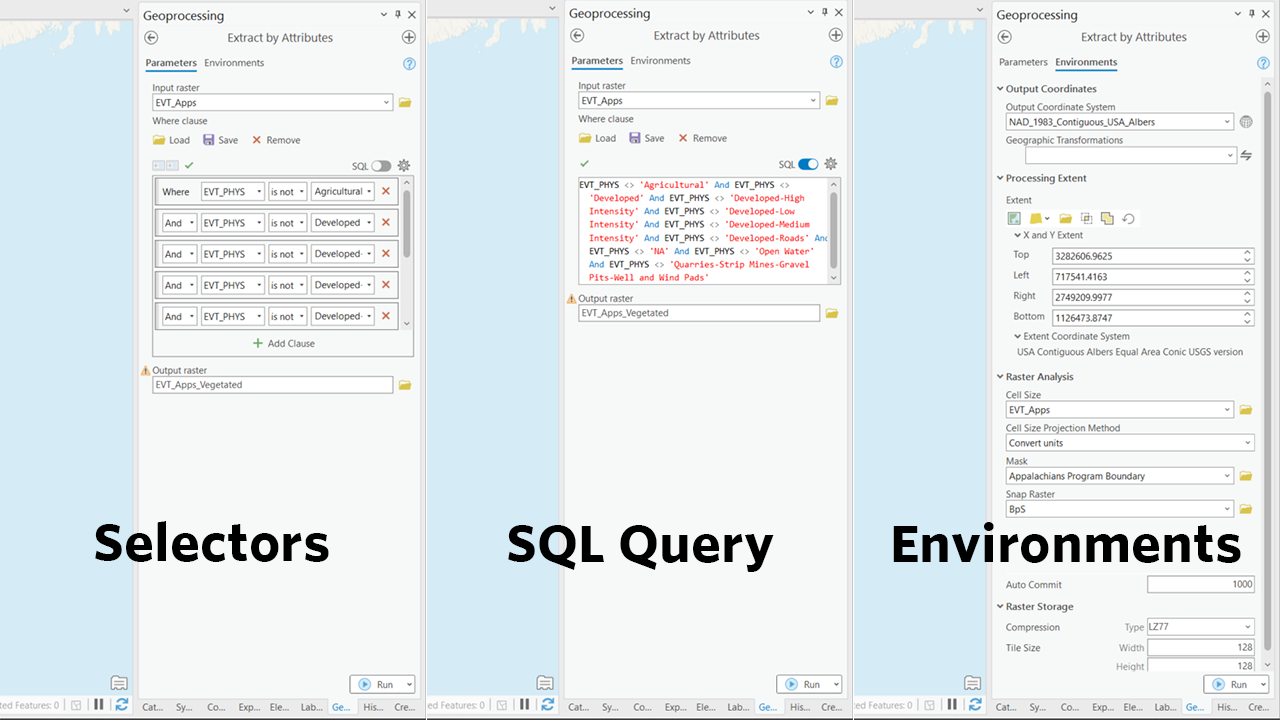
- Use the “Extract by Attributes” Tool: In ArcGIS Pro, use the Extract by Attributes tool to exclude non-relevant vegetation types.
For the Input Raster, select your clipped EVT raster.
In the where clause, paste the following, remembering to also select any other vegetation types you’ve elected to exclude: EVT_PHYS <> ‘Agricultural’ AND EVT_PHYS <> ‘Developed’ AND EVT_PHYS <> ‘Developed-High Intensity’ AND EVT_PHYS <> ‘Developed-Low Intensity’ AND EVT_PHYS <> ‘Developed-Medium Intensity’ AND EVT_PHYS <> ‘Developed-Roads’ AND EVT_PHYS <> ‘NA’ AND EVT_PHYS <> ‘Open Water’ AND EVT_PHYS <> ‘Quarries-Strip Mines-Gravel Pits-Well and Wind Pads’
- Use the “Extract by Attributes” Tool: In ArcGIS Pro, use the Extract by Attributes tool to exclude non-relevant vegetation types.
Screenshot for examining existing vegetation types
Still have questions? LANDFIRE is here to help.
Ask the LANDFIRE Helpdesk (email link).
Search and subscribe to the LANDFIRE YouTube Channel (see tutorials, Office Hours, quick demonstrations).
Join an Office Hour (monthly meeting with open format Q & A with LANDFIRE experts).
Schedule a meeting (email link) with TNC’s LANDFIRE Team.