FNA Process: Use EVT to mask BPS
Using the EVT raster to mask the BPS raster
To refine your analysis, you can use the extent of the new EVT raster with non-burnable values removed to mask the Biophysical Settings (BpS) raster. This process requires a Spatial Analyst license in ArcGIS Pro.
Step-by-step process
Screenshots of the process are included below the written instructions for those who find them useful.
Open the Extract by Mask Tool
- Navigate to the Spatial Analyst toolbox in ArcGIS Pro and open the “Extract by Mask” tool.
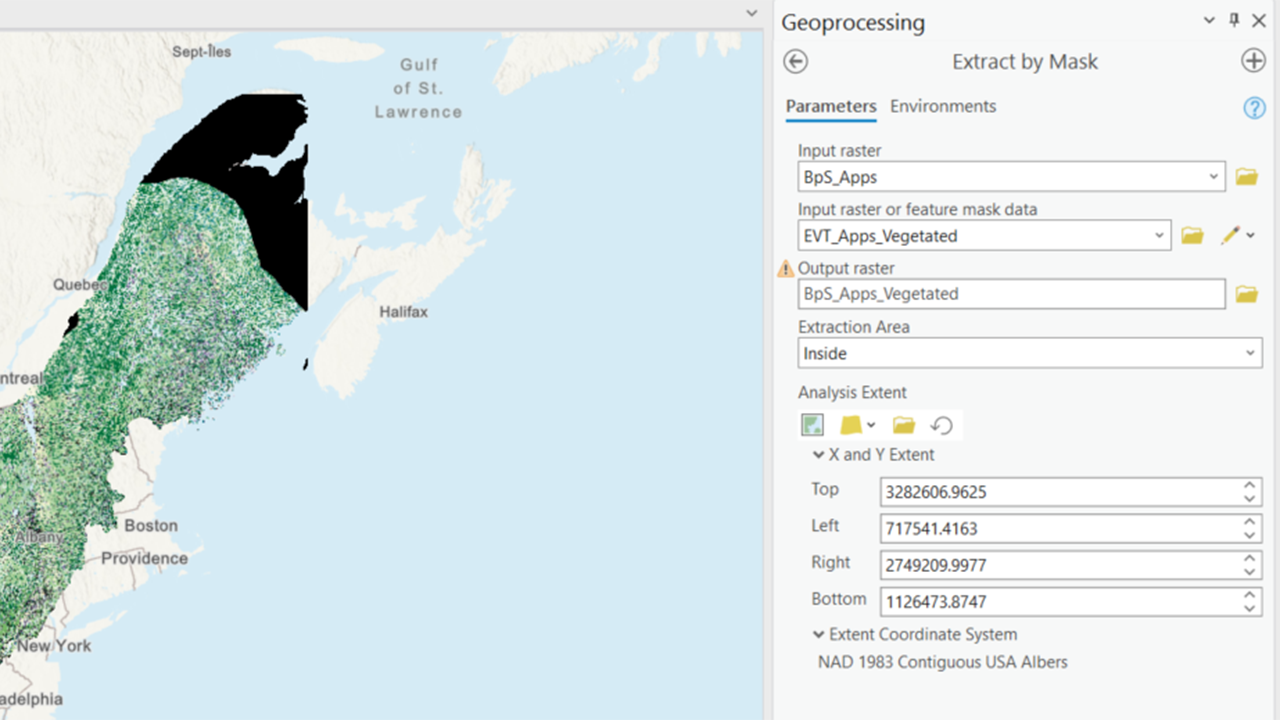
Select the Input Raster
- For the input raster, select the BpS raster that you previously clipped to your study area.
Select the Mask Data
- For the “Input raster or feature mask data,” use the new EVT raster with the non-burnable values or other values you don’t want to consider removed.
Set the Extraction Area
- Set the extraction area to “Inside” to ensure that only the areas within the mask are included in the output.
Check Environment Settings
- Before running the tool, check your environment settings:
- Ensure that your output raster will be in the correct coordinate system.
- Set the snap raster to your selected snap raster (in this case, the CONUS BpS Raster) to ensure alignment.
- Before running the tool, check your environment settings:
Run the Tool
- Execute the “Extract by Mask” tool to generate the masked BpS raster.
This process will help you refine your analysis by focusing only on the relevant areas, ensuring that your fire needs assessment is accurate and comprehensive.
Screenshot for masking the BPS raster with the EVT raster
Still have questions? LANDFIRE is here to help.
Ask the LANDFIRE Helpdesk (email link).
Search and subscribe to the LANDFIRE YouTube Channel (see tutorials, Office Hours, quick demonstrations).
Join an Office Hour (monthly meeting with open format Q & A with LANDFIRE experts).
Schedule a meeting (email link) with TNC’s LANDFIRE Team.