Biophysical Settings Descriptions
For the most up-to-date information on each LANDFIRE data product, please view the individual product pages on the LANDFIRE Program website.
The Biophysical Settings (BpS) Descriptions are a foundational LANDFIRE product. They set the stage for the development of many other LANDFIRE products such as the associated spatial datasets: Biophysical Settings, Succession Class, and Vegetation Departure. They have components imported from the BpS models, which we will discuss in the following section.
What you will find in this section
How to download all (or some) of the BpS Descriptions
The concept of BpS and succession class
How LANDFIRE documented ‘reference conditions’ (i.e., how our BpSs looked and functioned prior to European colonization)
What is contained in the BpS descriptions
Downloading all BpS descriptions
While we typically work with one or a small set of BpSs, there are times when downloading the entire set developed for the lower 48 states plus Hawaii and Alaska is most efficient.
To download all BpS descriptions
💡 Screenshots of the process are included below the written instructions for those who find them useful.
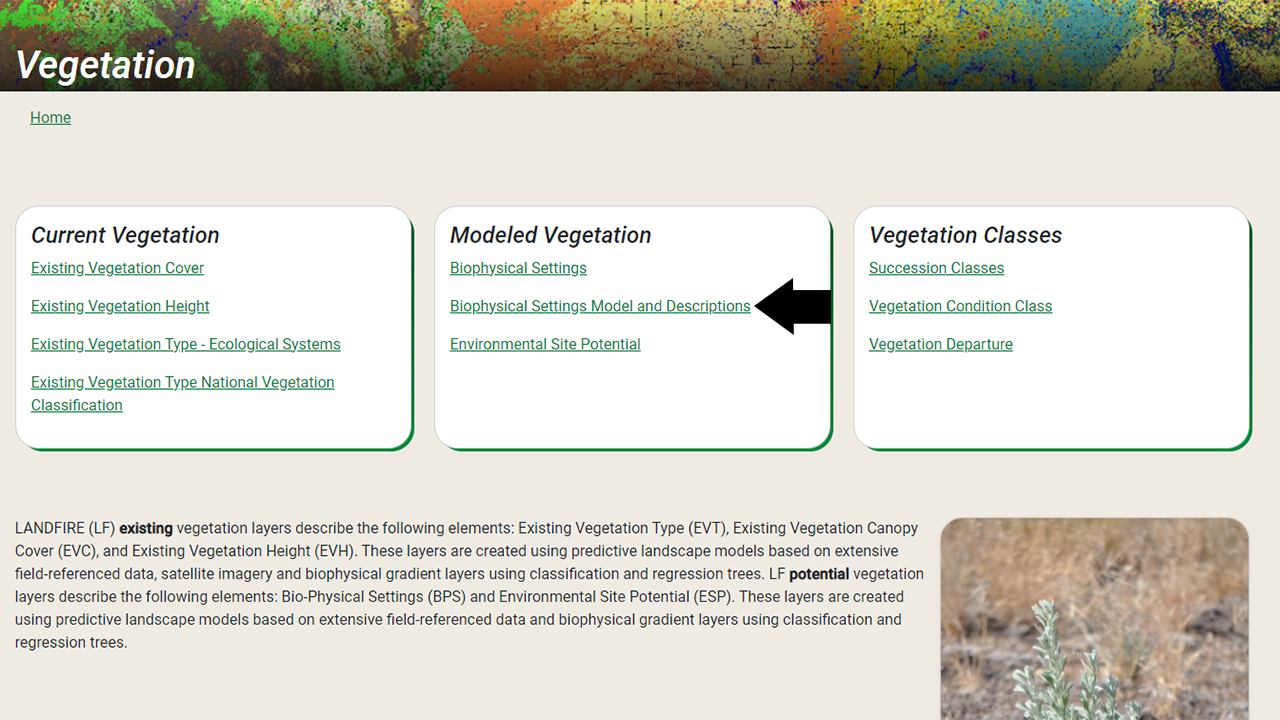
Navigate to the Biophysical Settings Models and Descriptions page of the LANDFIRE Program website (Vegetation→ Biophysical Settings Models and Descriptions).
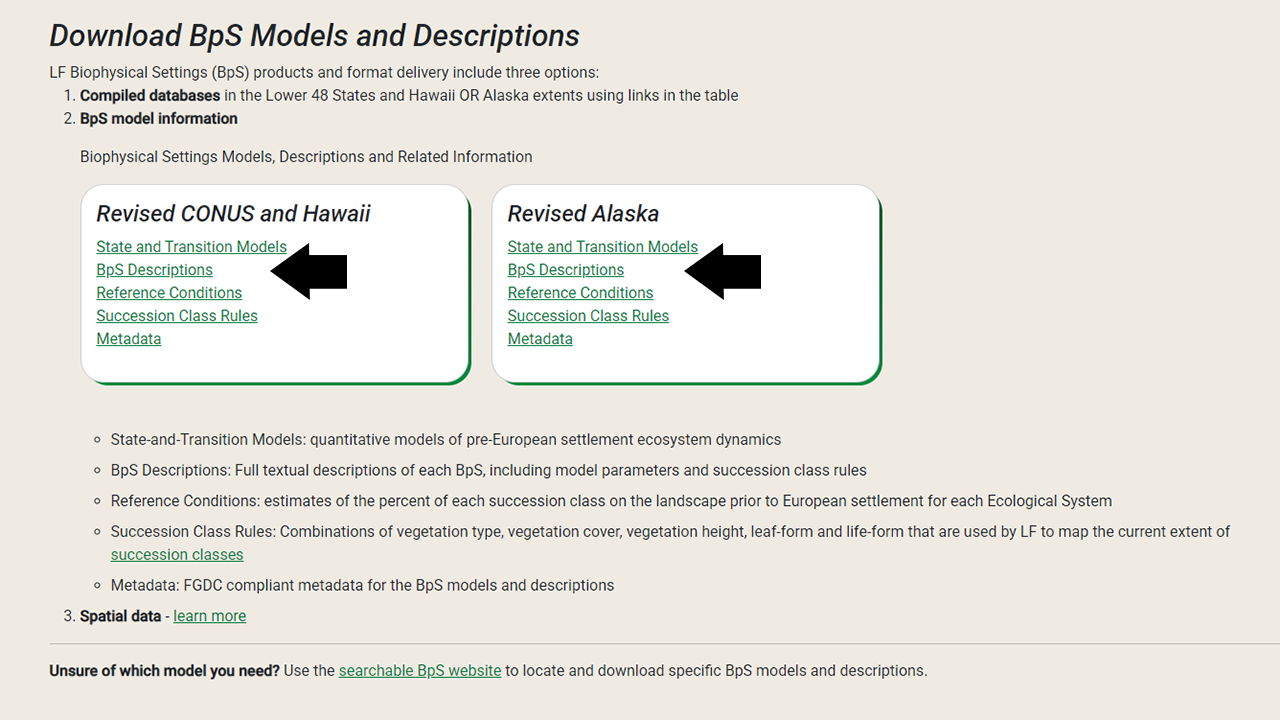
Scroll down to the Download BpS Models and Descriptions Section near the bottom of the page.
Here you will see two options: ‘Revised CONUS and Hawaii’ models and ‘Revised Alaska’ models. Select whichever set you would like, then click on the ‘BpS Descriptions’ which will trigger downloading of a .zip file. This file will most likely land in your Downloads directory.
Use your extraction tool of choice to unzip and explore. One possible way if you are using Windows is to:
right click the file
select ‘Extract all’ to access the Windows extraction tool.
Screenshot for where to find the Biophysical Settings Models and Descriptions Page
Screenshot for downloading and unzipping all BpS descriptions
Downloading one or a set of BpS documents
💡 Screenshots of the process are included below the written instructions for those who find them useful.
In support of a 2015 BpS review process, we created a BpS Models and Descriptions Support website, which has a page that allows for searching for, and downloading a single or a set of BpS Descriptions.
We recommend using a browser other than Google Chrome when accessing this site, as some users have been experiencing issues with downloading BpS documents when using the Chrome browser.
Select your BpSs of interest
Go to the search page.
From here, there are multiple ways to select BpS documents to download:
Use the filters on the left side of the page:
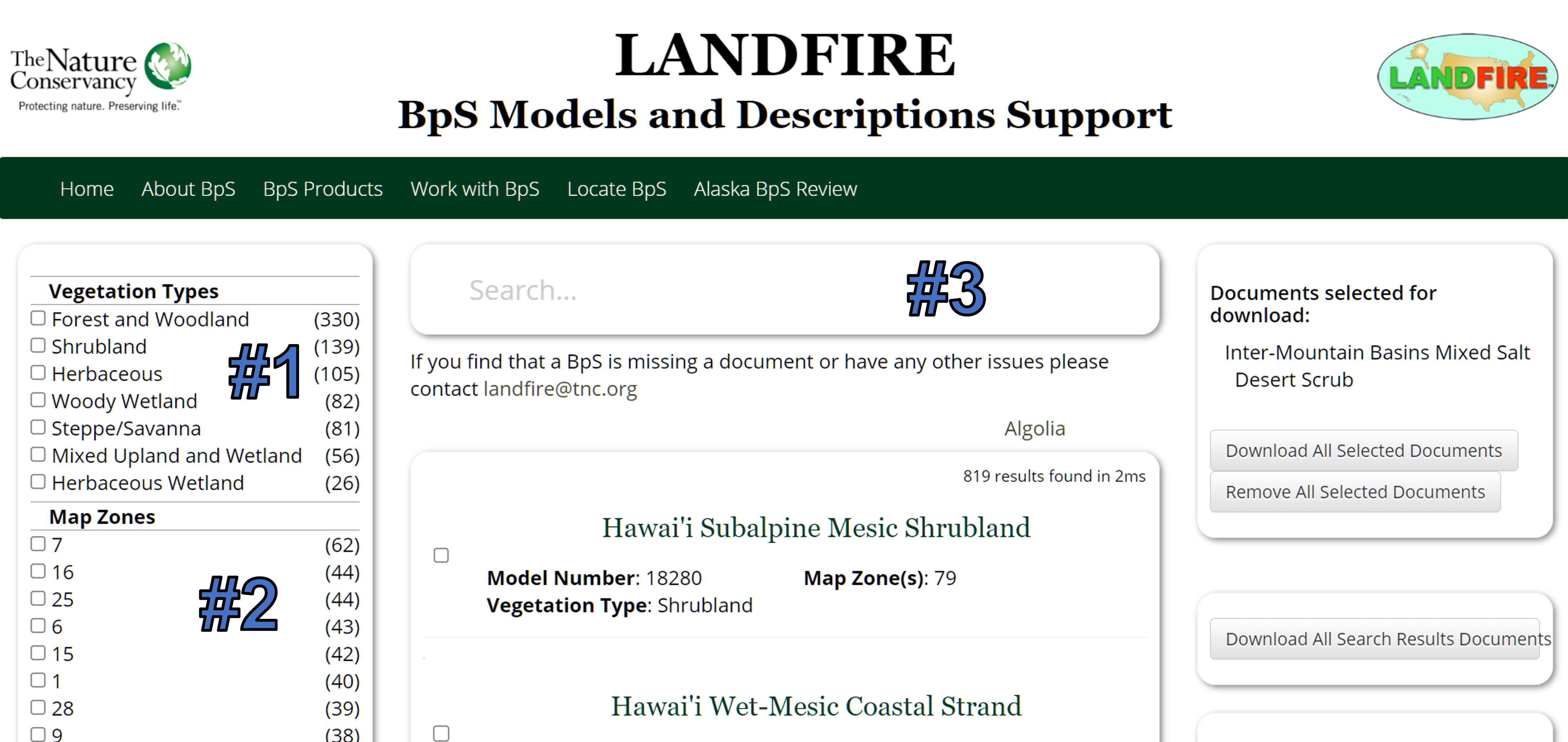
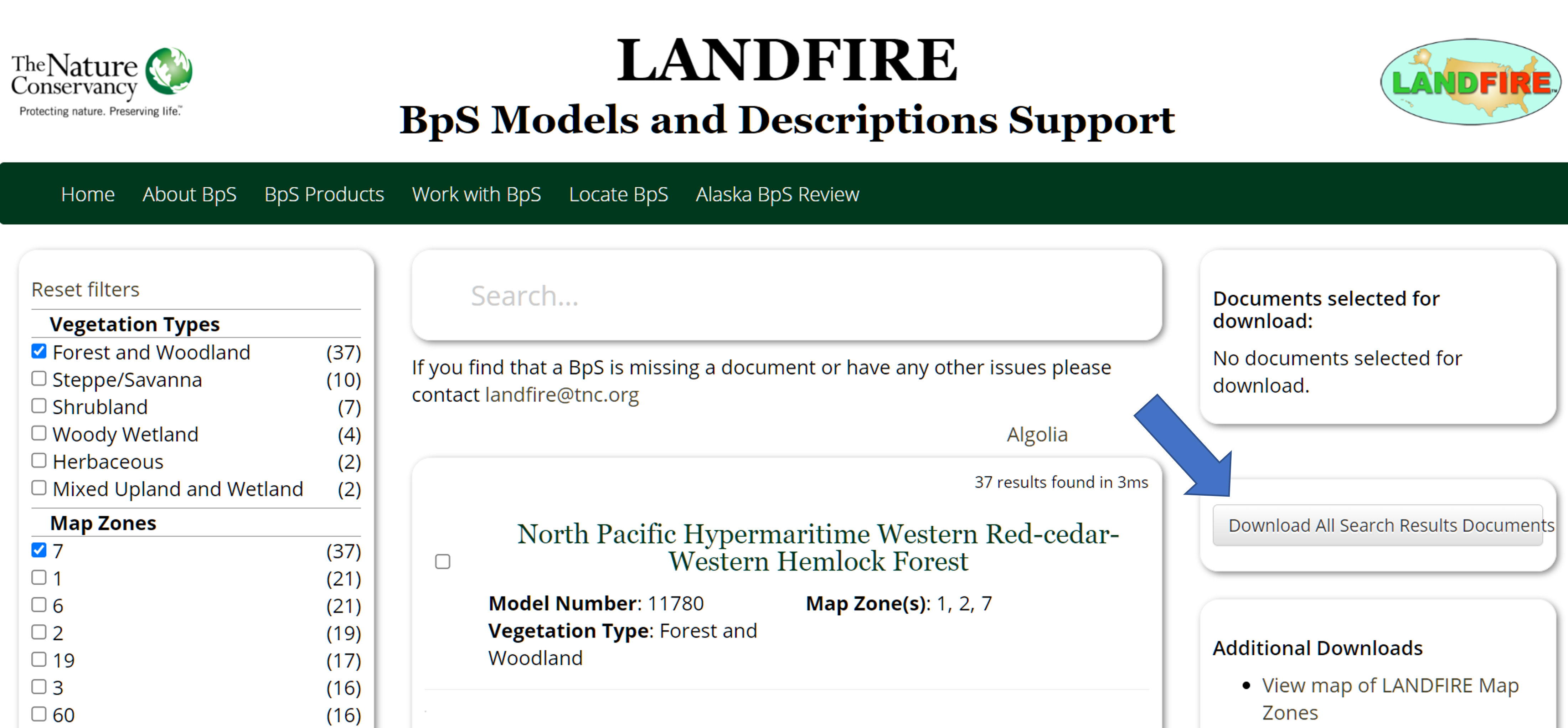
Use the checkboxes under the Vegetation Types heading to select all BpS documents for one or more broad Vegetation Types (#1 on ‘Ways to select’ screenshot below)
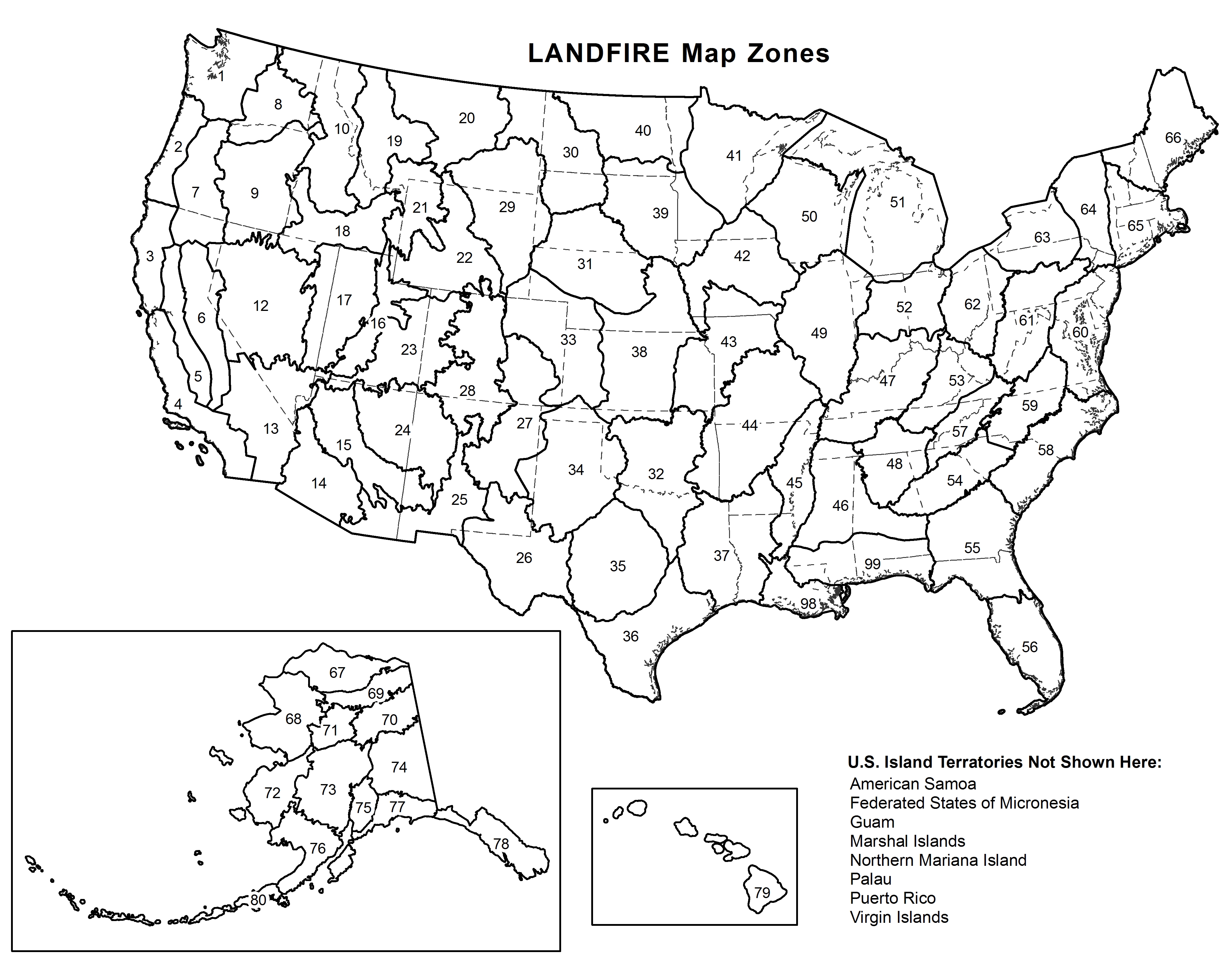
Use the checkboxes under the Map Zone heading to select all BpS documents for one or more LANDFIRE Map Zones (#2 on ‘Ways to select’ screenshot below).
- To get a Map Zone map you can click the View map of LANDFIRE Map Zones text (highlighted with blue arrow on ‘Ways to download’ screenshot below), or access it directly (opens a .jpg file).
Search for a BpS of interest by typing in the Search… box (#3 on ‘Ways to select’ screenshot below). A few things to keep in mind when searching:
You can search by genus and/or species or common name (e.g., ‘Fraxinus’, or ‘White Ash’ )
Most text terms will work, numbers will not. For example, ‘hurricane’ will return BpSs, ‘1362’ (an actual BpS number) will not.
You can first filter by ‘Vegetation Types’ and/or ‘Map Zones’, then search to narrow results.
Download documents of interest
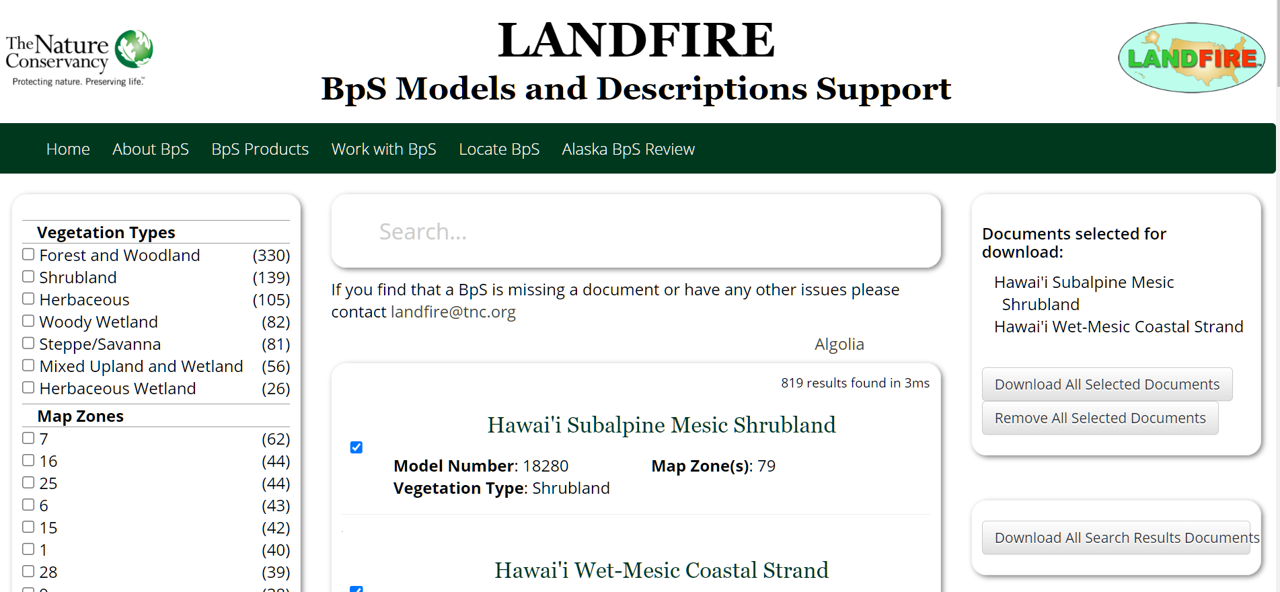
Once you have selected the BpS you want to get descriptions for you must take one more step to get your documents:
If you want all of the BpS documents for selected Vegetation Types and/or Map Zones you will click the ‘Download All Search Results Documents’ button (indicated with arrow on ‘Download all’ screenshot below).
If you have checked specific BpS for download, you will click the ‘Download All Selected Documents’ button (indicated with an arrow on ‘Download selected’ screenshot below).
Clicking either of the ‘Download’ buttons will initiate download of a .zip file that will most likely land in your Downloads folder. Use your extraction tool of choice to unzip and explore.
Beware when clicking the ‘Download All Search Results Documents’ button. If you’re not careful you will end up with a huge download of many more documents than you want! Make sure to filter by Vegetation Types and/or Map Zones first.
Screenshots showing how to select and download BpSs
What’s in a BpS document?
Once you download and unzip your selected BpS documents, what do you actually have? Inside the zip file, you will find one or more Word documents that in very general terms describe how the ecosystems of the US ‘looked and functioned’ prior to European colonization. We hope the documents are largely self-explanatory. That said, below we’ll highlight a few important considerations when reading these documents.
For more information on how BpS Documents drive the BpS Models, visit the LANDFIRE Vegetation Modeling website.
File name, Map Zones and that number at the top
The BpS documents were saved with a numeric code such as ‘13700_60_63_64_65_66.docx’. This number represents three things:
BpS code: this is the first 4 digits, e.g., ‘1370’ in our example for the ‘Appalachian (Hemlock-)Northern Hardwood Forest’.
BpS splits: this is the fifth digit, or ‘0’ in our example. Occasionally an original BpS would be split into multiple BpS on the advice of local expertise. For example, in the Great Lakes there is a ‘Boreal White Spruce-Fir-Hardwood Forest - Inland’ (BpS code 13651), and a ‘Boreal White Spruce-Fir-Hardwood Forest - Coastal’ (BpS code 13652), which have a ‘1’ and a ‘2’ in the file name, and BpS code.
Map Zones: the string of numbers separated by an underscore represents the Map Zones that this particular document (and associated BpS state and transition model) apply to.
You are able to rename the files once downloaded, but please be cautious about deleting the BpS code in the document, as this is the code that will link the document to all other Biophysical Settings products. For more information on the BpS model code and its importance, see the Deciphering the BpS Model Code pdf.
The BpS code allows you to link the BpS description to the BpS spatial data.
Modelers and reviewers table
This table provides the names of people who contributed to the development of the BpS description and model. The additional list of reviewers below the table lists the individuals who provided additional review circa 2018 to incorporate new science when possible.
Fire Frequency Table
The Fire Frequency Table contains information about fire frequency and severity. A few things to keep in mind when viewing this table include:
The Avg FI (FI = Fire Interval), and Percent of All Fires values are results of the BpS model.
The values in the Avg FI and Percent of All Fires columns represent fire frequency for the entire BpS across all succession classes, which may include classes which have very short FIs, and classes with very long FIs. To understand fire frequency and severity at the level of the succession class, users can refer to the Model Parameters Table (described below) or the BpS model.
The Min FI and Max FI columns, when populated, include the model developer’s estimate of the maximum and minimum fire frequency for the BpS.
An example Fire Frequency Table is replicated below.
| Severity | Avg FI | Percent of All Fires | Min FI | Max FI |
|---|---|---|---|---|
| Replacement | 1005 | 53 | ||
| Moderate (Mixed) | 1118 | 47 | ||
| Low (Surface) | ||||
| All Fires | 529 | 100 |
Fire interval is expressed in years for each fire severity class and for all types of fire combined (All Fires). Average FI is the central tendency modeled. The value in the ‘Percent of All Fires’ column represents the percent of fires modeled in that severity class (e.g. the value for ‘Percent of All Fires’ for replacement fire is calculated as 529/1005 in the table above). Minimum and Maximum FIs show the relative range of fire intervals as estimated by model contributors, if known.
Succession Classes – mapping rules
LANDFIRE did not attempt to map where succession classes were prior to European colonization, as they would have moved around. This table is used to map where succession classes are today. For example, in the ‘Succession Class Table’ below we have highlighted combinations of Existing Height and Cover (and lifeform) that would be mapped as Succession Class A.
For more information on Succession Classes and how they are mapped, visit the Succession Class page of the website.
| Mapping Rules | |||||||||||
|---|---|---|---|---|---|---|---|---|---|---|---|
| Upper Layer Lifeform | Height (m) | Canopy Cover (%) | |||||||||
| 0-10 | 11-20 | 21-30 | 31-40 | 41-50 | 51-60 | 61-70 | 71-80 | 81-90 | 91-100 | ||
| Herb | 0-0.5 | UN | UN | UN | UN | UN | UN | UN | UN | UN | UN |
| Herb | 0.5-1.0 | UN | UN | UN | UN | UN | UN | UN | UN | UN | UN |
| Herb | >1.0 | UN | UN | UN | UN | UN | UN | UN | UN | UN | UN |
| Shrub | 0-0.5 | UN | UN | UN | UN | UN | UN | UN | UN | UN | UN |
| Shrub | 0.5-1.0 | UN | UN | UN | UN | UN | UN | UN | UN | UN | UN |
| Shrub | 1.0-3.0 | UN | UN | UN | UN | UN | UN | UN | UN | UN | UN |
| Shrub | >3.0 | UN | UN | UN | UN | UN | UN | UN | UN | UN | UN |
| Tree | 0-5 | UN | UN | UN | UN | UN | UN | UN | A | A | A |
| Tree | 5-10 | UN | UN | UN | UN | C | C | C | A | A | A |
| Tree | 10-25 | UN | UN | UN | UN | C | C | C | B | B | B |
| Tree | 25-50 | UN | UN | UN | UN | C | C | C | D | D | D |
| Tree | >50 | UN | UN | UN | UN | UN | UN | UN | UN | UN | UN |
Succession class letters A-E are described in the Succession Class Description section. Some classes use a leafform distinction wher a qualifier is added to the class letter (i.e. Brdl (broadleaf), Con (conifer), or Mix (mixed conifer and broadleaf)). UN refers to uncharacteristic native or a combination of height and cover that would not be expected under the reference condition. NP refers to not possible or a combination of height and cover which is not physiologically possible for the species in the BpS.
LANDFIRE also delivers a succession class mapping rules spreadsheet (downloads a zip file). The spreadsheet contains rules for mapping the states of every BpS including additional mapping criteria that are not included in the description document. We suggest that users refer to the rules in the description document to get a basic understanding of succession class structure. Users that need a complete and detailed ruleset should use the mapping rules spreadsheet. You can find that spreadsheet on the Biophysical Settings Description and Quantitative Models page of the LANDFIRE Program website.
Succession Classes – description
This section provides a description of the development states of a BpS as conceptualized by the model developers within the LANDFIRE modeling framework. Developers were allowed to describe and model up to five states. Each class is identified by a letter (A-E) and a name that describes its cover and structure (e.g. Early Development 1 All Structures).
The combination of the BpS code and the class letter links the succession class description to the reference condition table. The BpS code and class name link the succession class to the BpS model. For more detail on this, see our linking the BpS models and descriptions pdf.
The number to the right of the class letter represents the modeled reference condition for that class. In other words, the percent of the landscape that you would expect to be in the class on average, over long time periods, for the extent of a BpS within a mapzone.
Model Parameters Table
The model parameters table is essentially an export of the SyncroSim BpS model parameters. In other words, this table compiles information provided by model developers about the probability and impact of natural disturbances into the modeling software.
In the Model Parameters Table below, the top row would read something like “the wind/weather/stress disturbance would impact the Early1:All succession class once every 1000 years on average (or 0.001% of the succession class yearly on average), and when that disturbance happened, the vegetation would respond by returning back to the beginning of the Early1: All succession class.”
| Disturbance Type | Disturbance occurs in | Moves vegetation to | Disturbance Probability | Return Interval (yrs) | Reset Age to New Class Start Age after Disturbance? | Years Since Last Disturbance |
|---|---|---|---|---|---|---|
| Wind or Weather Stress | Early1:ALL | Early1:ALL | 0.001 | 1000 | Yes | 0 |
| Replacement Fire | Early1:ALL | Early1:ALL | 0.001 | 1000 | Yes | 0 |
| Alternative Succession | Mid1:OPN | Late1:CLS | 1 | 1 | Yes | 100 |
| Mixed Fire | Mid1:OPN | Mid1:OPN | 0.001 | 1000 | No | 0 |
Reset age class start after disturbance
In SyncroSim, the ‘Age Reset’ field indicates whether a transition resets the age of a simulation cell to the ‘Age Min’ of the destination class. If the value is yes, the age is reset; if no, the age remains unchanged. According to LANDFIRE standards, probabilistic transitions that do not change the class do not reset the age (Age Reset = No), except for class A to A replacement disturbances. Transitions that result in a state change do reset the age (Age Reset = Yes).
Years since last disturbance
Years since last disturbance, referred to as TST Min (time-since-transition minimum) in SyncroSim, specifies the minimum number of years that must pass before a transition can occur. In LANDFIRE models, this is used only with Alternative Succession transitions and is related to fire disturbances (surface, mixed, and replacement).
TST Min is commonly used in dry forests that are maintained by frequent fire. Fire in these systems maintains a relatively open canopy, but in the absence of regular fire the canopy becomes closed. In this case TST Min can be used to control that transition from open to closed classes. For example, a ponderosa pine forest might have an open class with an alternative succession pathway to a closed class with a TST Min of 20 years. The effect of this in the model is that the transition from the open to the closed state only occurs if 20 or more years have passed since the last fire.
Similarly, in the North-Central Interior Dry-Mesic Oak Forest and Woodland of the Great Lakes region, TST is used to transition the mid-open class to the late-closed class if there is a lack of disturbance for 50 years. Otherwise the mid-open class succeeds to late-open due to periodic surface fires that prevent (as long as they happen before 50 years) canopy closure
Helpful Resources
Deciphering the BpS model code (opens a pdf on Box)
Linking the Bps models and descriptions (opens a pdf on Box)
Succession class mapping rules spreadsheet (downloads a zip file)
Blankenship, K., Swaty, R., Hall, K.R., Hagen, S., Pohl, K., Shlisky Hunt, A., Patton, J., Frid, L. and Smith, J., 2021. Vegetation dynamics models: a comprehensive set for natural resource assessment and planning in the United States. Ecosphere, 12(4), p.e03484. Link to paper
BpS Models Page on the LANDFIRE Program Website
Still have questions? LANDFIRE is here to help.
Ask the LANDFIRE Helpdesk (email link).
Search and subscribe to the LANDFIRE YouTube Channel (see tutorials, Office Hours, quick demonstrations).
Join an Office Hour (monthly meeting with open format Q & A with LANDFIRE experts).
Schedule a meeting (email link) with TNC’s LANDFIRE Team.