Data: Biophysical Settings (BPS)
What are Biophysical Settings?
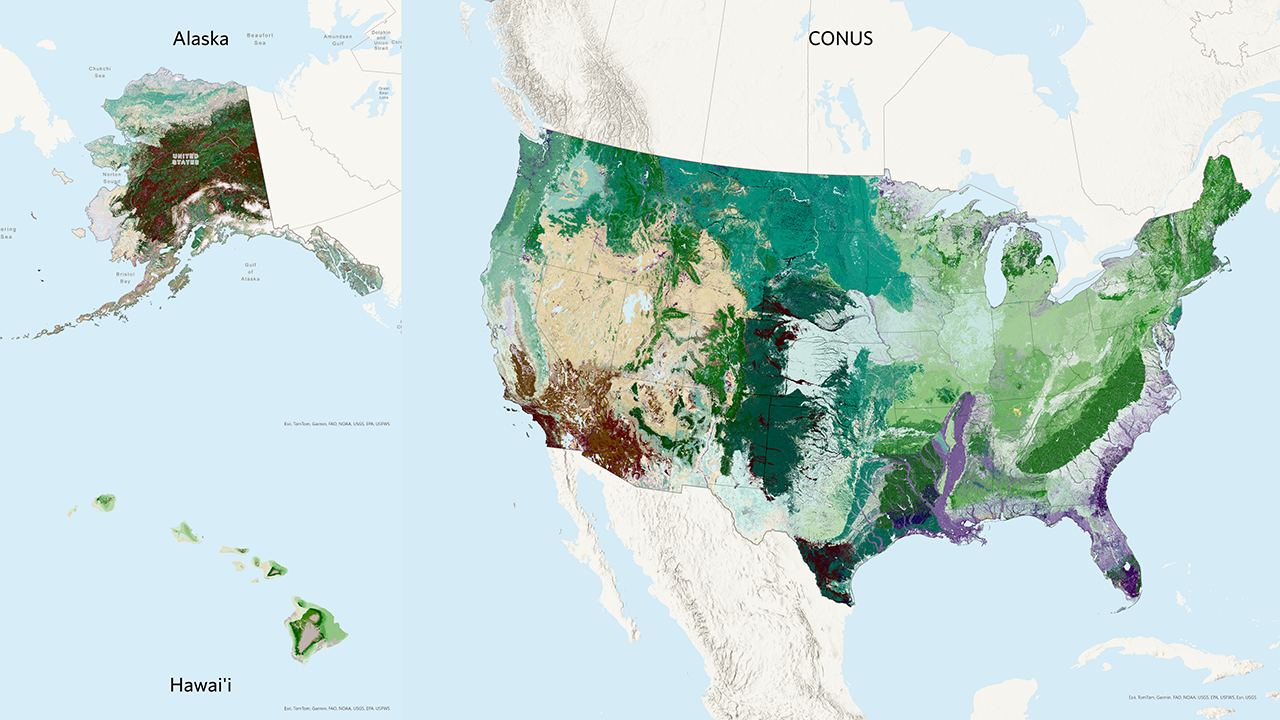
Biophysical Settings (BPS) represent reference conditions, helping us examine historical disturbance patterns and estimate proportions of succession classes prior to European colonization. This information provides a baseline for understanding current conditions and planning restoration efforts.
Biophysical Settings (BPS) are a foundational concept for LANDFIRE defined on the LANDFIRE Program website as:
“…a modeled representation of the vegetation system that may have been dominant on the landscape prior to Euro-American settlement and is based on both the current biophysical environment and an approximation of modeled past disturbance regimes.”
We like to think of the Biophysical Settings as ‘ecosystem habitats’, or ‘potential ecosystem footprints’. The BPS concept asks “where might an ecosystem occur” based on abiotic factors such as soils, surficial geology, slope and elevation as well as natural disturbance regimes.
For example, in many regions across the United States, the Biophysical Settings layer helps us understand the historical distribution of various ecosystems, such as grasslands, forests, and wetlands. By comparing these reference conditions to current vegetation, we can identify areas that have undergone significant changes and need restoration or other management.
Using BPS in fire needs assessments
BPS is a valuable tool in fire needs assessments for several reasons:
Understanding Historical Vegetation: BPS helps us understand what vegetation was historically present in an area. This information is crucial for planning restoration and management decisions.
Fire Regime Data: BPS is directly tied to fire regime data, which helps us understand how much of the landscape burned historically. This information is essential for planning prescribed burns and other fire management activities.
Reference Conditions: While we can conduct a fire needs assessment without BPS, it provides useful information on reference conditions, helping us make more informed decisions.
We are not looking at climate change, and we are not necessarily saying that reference conditions are the same as “Desired Future Conditions.” However, they do help us understand the conditions that ecosystems evolved with and to which they adapted over time. In some ecosystems, departure from reference conditions means higher vulnerability to climate change, and we can look at the reference vs. current conditions to assess what we might need to do to adapt.
BPS models and SyncroSim
SyncroSim, developed by ApexRMS, is the tool currently used for BpS models. It allows users to develop and run aspatial or spatially-explicit, stochastic state-and-transition simulation models (STSMs) of vegetation change. SyncroSim is designed to simulate and compare possible vegetation conditions across a landscape over time by considering the interaction between succession, disturbances, and management. LANDFIRE uses the SyncroSim package ST-Sim to estimate historical fire frequency and severity.
SyncroSim and ST-Sim, have been supported by several agencies, including The Nature Conservancy, U.S. Forest Service, U.S. Geological Survey, and LANDFIRE. As a result, it is available as a free download.
The LANDFIRE Reference Condition table is a MS Excel file that provides LANDFIRE’s modeled estimate of historical fire frequency and severity for every BPS. This information is also in the attribute tables of the LANDFIRE Fire Return Interval and Percent Fire Severity spatial layers. This will directly plug into the process to help us understand historic and current fire on the landscape.
You can (and are encouraged to) re-define fire return intervals to better match what is on your landscape. The TNC LANDFIRE team encourages you to submit your modifications to us for possible inclusion in future iterations of LANDFIRE data.
Learn more
For more detailed information on Biophysical Settings and SyncroSim, please visit the following web pages:
These resources provide comprehensive information on Biophysical Settings and their applications in landscape management.
Still have questions? LANDFIRE is here to help.
Ask the LANDFIRE Helpdesk (email link).
Search and subscribe to the LANDFIRE YouTube Channel (see tutorials, Office Hours, quick demonstrations).
Join an Office Hour (monthly meeting with open format Q & A with LANDFIRE experts).
Schedule a meeting (email link) with TNC’s LANDFIRE Team.